
How to install a modpack from Modrinth
A modpack bundles a loader, a Minecraft version and a list of mods, so a server installs it as a whole rather than mod by mod. Every player needs the same pack and version on their own game. Back up first: a modpack replaces the server software.
Updated 16 November 2026
These steps use Atlas, the Loreline control panel. Open this guide in Atlas.
- Take a backup first. A modpack replaces the server software, and it can break an existing world.
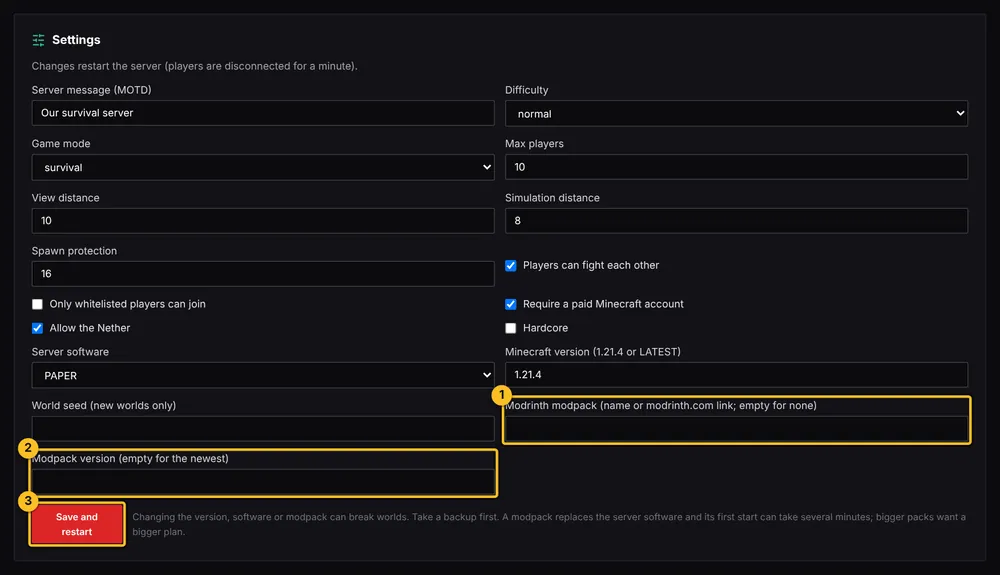
- Find the modpack on Modrinth and copy its name or its web address.
- In Atlas, open Settings for your server and paste it into the Modrinth modpack field. Leave Modpack version empty for the newest, or enter a version number to pin it.
- Press Save and restart. The first start can take several minutes while everything downloads, and bigger packs want a bigger plan.
- Watch the Server log. When it says Done, the server is ready and players can join.
- Each player needs the same modpack on their own game. The Modrinth app lets them install it in a few clicks. Use the same version as the server.
More Minecraft guides
- Which server software do I need for mods or plugins?
- How to install plugins (Paper or Purpur)
- How to install mods (Fabric, Forge or NeoForge)
- How to change server settings (difficulty, game mode, MOTD, whitelist)
- How to edit a plugin or mod config file
- How to update or remove a mod or plugin
- My server will not start after adding a mod or plugin
- How to upload a world you already have
- All Minecraft guides
Minecraft hosting from Loreline
Mods, plugins and modpacks, nightly backups and one control panel.