
Which server software do I need for mods or plugins?
Plugins need Paper or Purpur, mods need Fabric, Forge or NeoForge, and vanilla runs neither. You can't run plugins and mods on the same server, so decide which you want first, then pick the Minecraft version your add-ons support.
Mods and plugins are different things, and each needs the right server software. Pick it in Settings under Server software.
Updated 16 November 2026
These steps use Atlas, the Loreline control panel. Open this guide in Atlas.
- Plugins (small server add-ons such as permissions, homes or land claims) run on Paper or Purpur. Most people who want a normal survival server with extras choose Paper.
- Mods (which change the game itself, such as new blocks or machines) run on Fabric, Forge or NeoForge. Each loader has its own mods, and a mod built for one will not load on another.
- Vanilla runs neither. It is the plain game, good for a simple server with friends.
- You cannot mix the two on the same server. If you want plugins and mods together, ask in a support request what is possible.
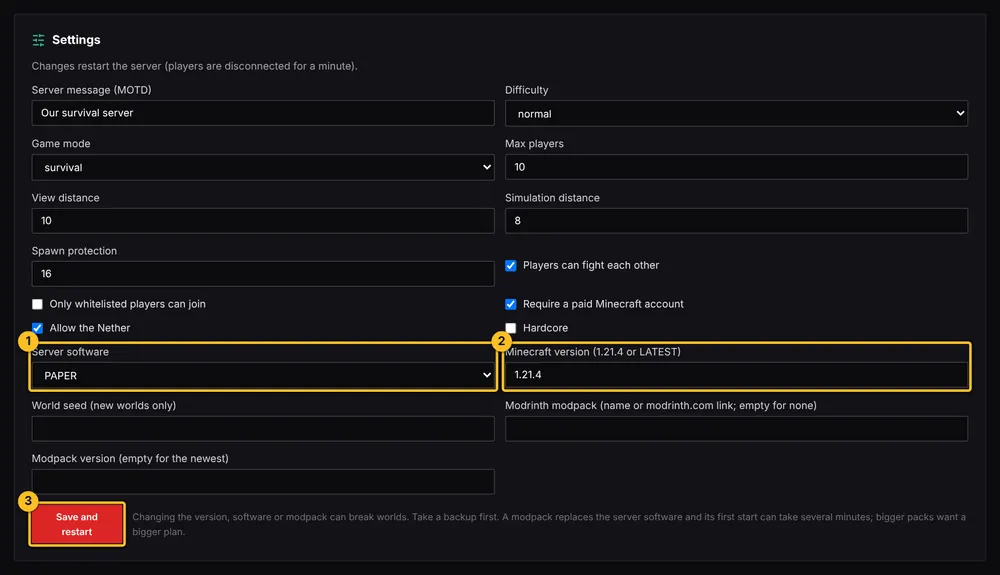
Whatever you pick, the Minecraft version must match your mods or plugins. Check each download page for the versions it supports.
More Minecraft guides
- How to install plugins (Paper or Purpur)
- How to install mods (Fabric, Forge or NeoForge)
- How to install a modpack from Modrinth
- How to change server settings (difficulty, game mode, MOTD, whitelist)
- How to edit a plugin or mod config file
- How to update or remove a mod or plugin
- My server will not start after adding a mod or plugin
- How to upload a world you already have
- All Minecraft guides
Minecraft hosting from Loreline
Mods, plugins and modpacks, nightly backups and one control panel.